Joins for you, automatically
Wakes your Mac at the right time, opens Zoom, and joins your scheduled meetings and webinars.
The Mac app for Zoom meetings
RecordLah! wakes your Mac, joins your scheduled Zoom meetings and webinars, records the window and its audio, downloads the handouts, writes the notes, and tells you it is done.
No account · no card · recordings stay on your Mac
From joining to recording to notes, it takes care of the details so you can be somewhere else.
Wakes your Mac at the right time, opens Zoom, and joins your scheduled meetings and webinars.
Captures the Zoom window and its audio — and your mic, if you want it — to your Mac, not the cloud.
Downloads webinar handouts, writes notes from the recording, and tells you when it is done.
How it works
Set it once. Everything after that happens without you.
It finds the Zoom invitations already in your Mail and Calendar.
It holds sleep off, and wakes in time.
Opens the link and waits out the lobby.
Zoom's window and its audio, plus your mic.
Files it all, then messages your phone.
The screens you will actually spend time in.
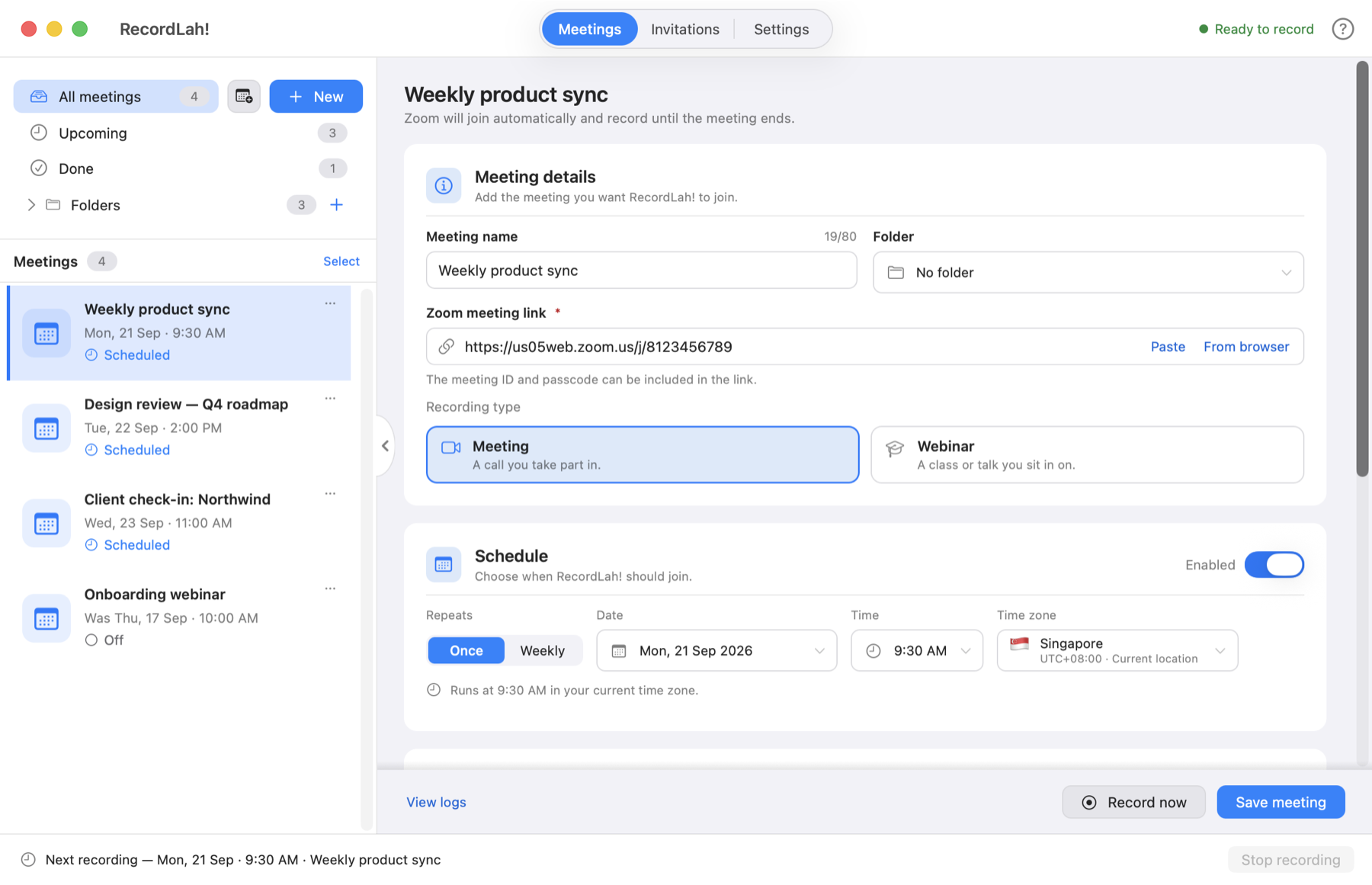
Meetings and scheduling
What is coming up, what has been recorded, and what did not run — and why. A meeting is a name, a link and a time.
Zoom provides everyone else’s audio. Add your microphone so the recording includes your voice too.
Kept for this meeting, so this is not asked again. Change it any time under Your microphone.
Sound and quality
The meeting's audio comes from Zoom itself, so your speaker volume is beside the point. It asks once whether to add your own microphone, with a level to watch before you commit.
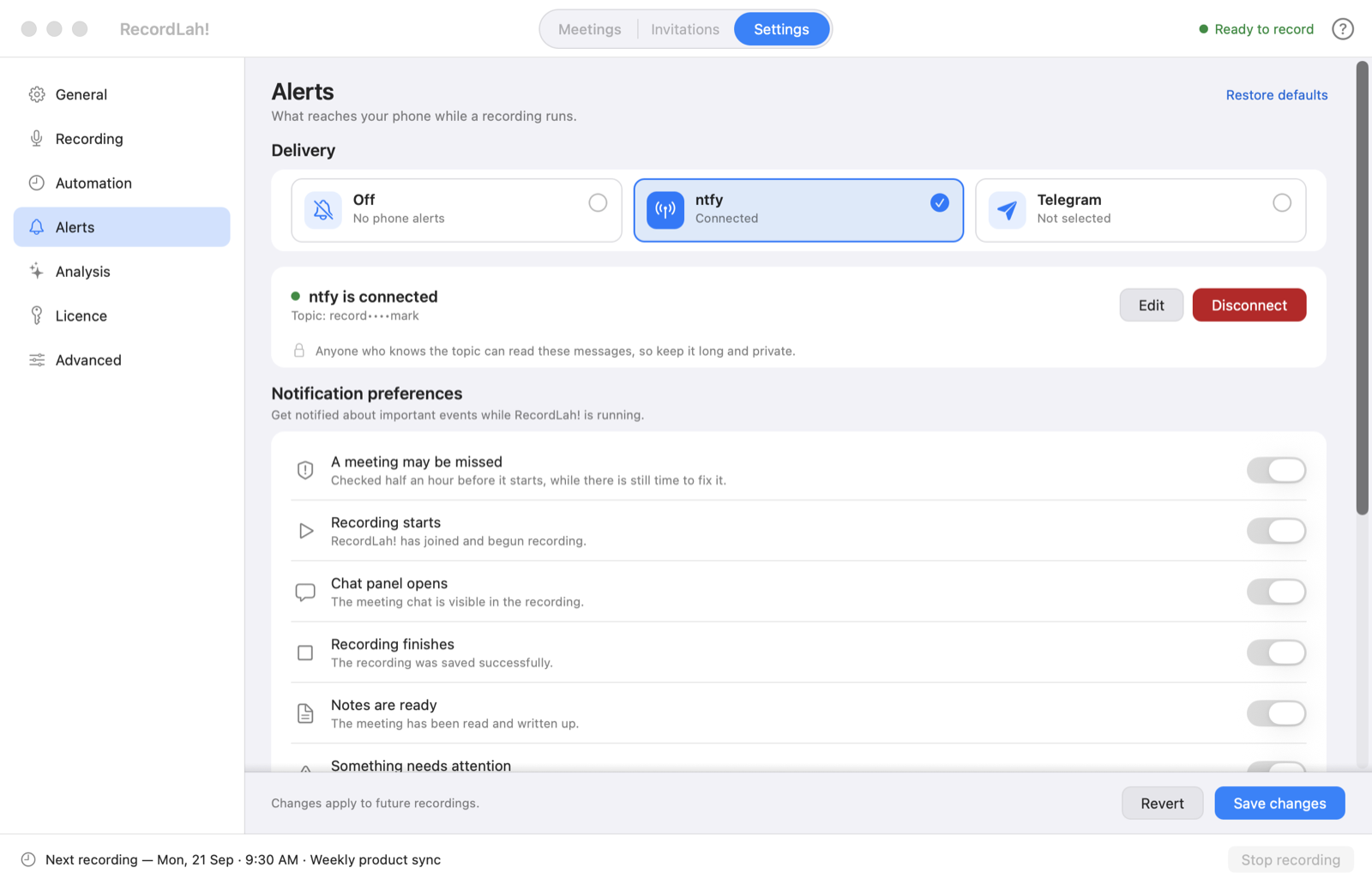
While you are away
Half an hour before, while there is still time to fix something — then when it starts, when it finishes, and when anything goes wrong. Over ntfy or Telegram.
Playback and analysis
Watch the recording, read the notes it wrote, skim the full transcript, and open the handouts the webinar sent — without leaving the app.
It records at 9:30 PM your time, and says so before it does.
Meetings across zones
A meeting keeps the zone it was scheduled in, so a webinar set for New York records at the right moment here — not eight hours out. Move your Mac to another country and everything already in the list re-times itself.
Meetings you join yourself
You do not have to schedule anything. Join a Zoom call and a panel appears over it asking whether to record — once, and never again for that meeting if you say no. Your microphone is a tick on the same panel, because on a call you are in, you are talking.
Which is the only kind that needs recording by itself.
Records just the meeting window, not your desktop.
Include your own voice when you want it, per meeting.
Downloads what the webinar shares, beside the recording.
Over ntfy or Telegram, when it matters.
A summary written afterwards, with your own prompt.
Scans Apple Mail and your Calendar for Zoom links.
A panel over Zoom offers it, once per meeting.
Follows the Mac, or stays where you put it.
Your privacy
It saves everything locally, on your Mac. No uploads, no account, no subscription. Most tools in this category send your meeting to a server and hand it back; this one has no server to send it to.
Flexible settings
The app works out what an hour costs before you record it, and says so.
720p · 15 fps
about 300 MB an hour
Smallest files. The shipped default.
1080p · 30 fps
about 600 MB an hour
A good balance for most meetings.
1080p · 60 fps
about 1.2 GB an hour
For anything with motion in it.
Get started
The trial is the whole app. Point it at something you have this week and see what comes back.
See how it works on your own meetings.
Download for MacNo account · no card · macOS 13+
Buy once, keep it.
No subscription · macOS 13+ · Apple Silicon and Intel
Frequently asked
Yes, and with Zoom Events. A webinar is marked as one on the meeting, which is also what decides that your microphone stays out of it — a webinar is one-way. Registration pages and event lobbies are handled on the way in.
Yes. There is no server in the middle: the recording is made by your Mac and saved to a folder you choose, as a plain .mp4. The one exception is the optional AI notes, which are off unless you turn them on.
No. There is no sign-up, no login and nothing to verify. Download it and schedule a meeting.
No — that is the point of it. It holds the Mac awake, joins at the hour you set, records, and stops when the meeting ends. You can be asleep, or out.
The run says so and stops, rather than sitting there. The meeting's row tells you which way it failed — the link never opened, it could not join, the webinar had already ended — and the full log is one click away.
macOS 13 or later, on both Apple Silicon and Intel Macs.
Set it once, and stop thinking about it.
Try 3 recordings freeNo account · no card · macOS 13+